

 Δωρεάν αποστολή για χιλιάδες είδη
 100% ασφαλείς ηλεκτρονικές πληρωμές
 30 ημέρες διαθέσιμες για την επιστροφή των αγαθών
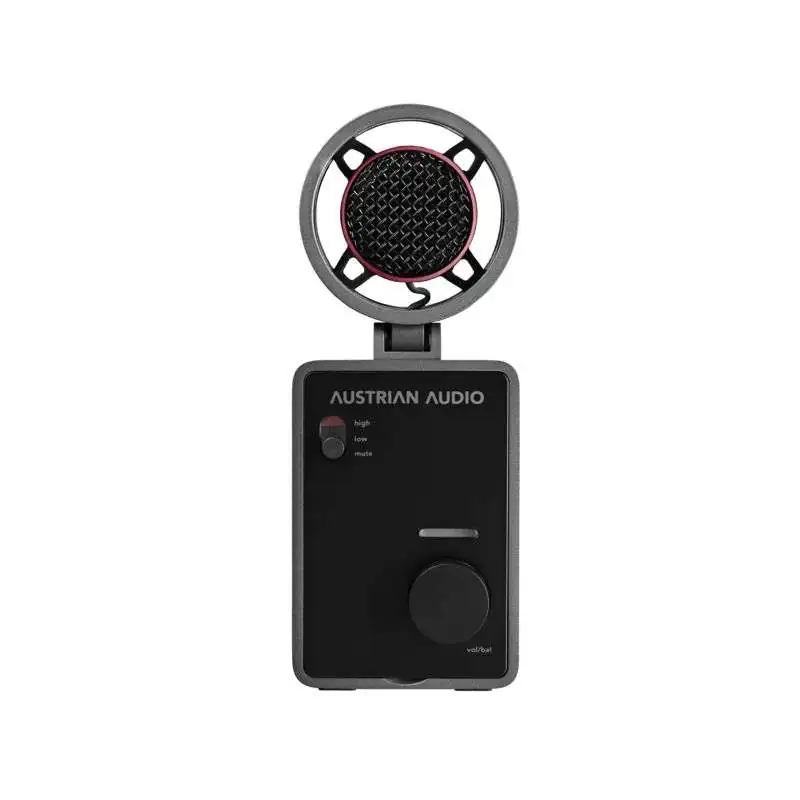
The Austrian Audio MiCreator Studio is a USB microphone for a wide range of applications. Thanks to its cardioid characteristic, the microphone is perfect for voice and instrumental recordings and suppresses sound hitting the back of the microphone to the maximum. It has also been designed to be placed on a table or stand. For this purpose, there is a 3/8" thread on the underside, which can be enlarged to a 5/8" thread if required using the thread adapter supplied. Thanks to the rubber feet, which are also located on the underside, the MiCreator Studio microphone always stands securely on flat surfaces. Nevertheless, it can also be used as a hand-held microphone, as a vibration-mounted capsule has been installed to provide optimum insulation against structure-borne noise. Regardless of where and how the microphone is positioned, it always makes sense to point the swivel head towards the source to be recorded. To counteract unwanted effects, the MiCreator Studio has an internal pop protection, which can be replaced by an optionally available pop protection (e.g. Austrian Audio OCP8) if it is not sufficient.
The microphone starts automatically when it is connected via the USB-C socket, so it does not have an on/off switch. During the start-up process, a red LED flashes briefly, after which the LEDs switch to green volume mode. The main headphone output is located on the back of the MiCreator Studio and is controlled via the volume/monitor control on the front. To adjust the volume, it is necessary to set the LED bar to green, which is made possible by pressing the knob. If the knob is pressed a second time, the LED bar changes color to red and monitoring settings can be made.
On the front panel there is a microphone gain switch with three engagement options. If this switch is set to "mute", the microphone is muted on the input side, which is also visually indicated by a red marking on the switch. If the switch is set to "low", the microphone signal is amplified to 0dB and to "high" to 20dB. Additional input amplification of up to 15dB is possible via the USB-C connection.
In addition to the main headphone output "out", there is another "in/out" socket on the back of the device, which can be used to connect a second pair of headphones or , for example, the MiCreator Satellite. This connection is also controlled via the volume/monitor control on the front. To adjust the input gain of the "in/otut/" socket, there is a "high/low" switch above it, whereby the values for "high" and "low" are the same as those of the switch on the front panel. If an instrument is connected via an instrument cable or a second pair of headphones, it is advisable to select the "low" option on the switch. With this setting, the input impedance is also set to the highest possible value in order to distort the signal from the connected device as little as possible. Stereo recordings are possible with the MiCreator Studio as soon as a second microphone is connected at the rear.
Χαρακτηριστικά